 What2Eat
How What2Eat works
From opening the app to knowing what's for dinner takes about a minute. Here is the full flow, plus how the other tools fit in.
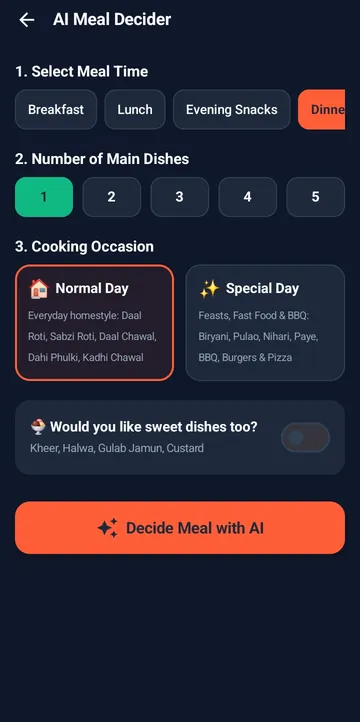
Deciding a meal, step by step
Install What2Eat from Google Play
What2Eat is free on Android. Open it and allow location if you want city-based features like Dine Out, or choose your city by hand.
Set your Kitchen Preferences
Tell the app which dishes you want to cook, which you'd rather never see and your daily habits. This takes a couple of minutes and you can change it any time.
Tap Decide Now
From the home screen, open the Meal Decider. Pick a meal time, the number of main dishes, a normal or special day, and whether you want sweets.
Review your suggestion
Each dish shows cooking time, cuisine and difficulty. Swap a single dish, ask for more suggestions, or change settings and decide again.
Open the recipe
Tap the dish for ingredients, numbered steps, servings and a chef's tip. Switch the recipe language if someone else is cooking.
Tap “Cooking this today”
The dish is saved to your cooked history. For the next 30 days, What2Eat avoids suggesting it again so your meals stay varied.
When the question is different
Not every day starts with "what should I cook?". Here is which tool to open.
"I have chicken, tomatoes and onions"
Open Pantry Matcher, add your ingredients and tap Find Recipes.
"Eight people are coming on Sunday"
Open the Guest Feast Planner, choose mains and sweets, and generate a menu.
"I want to shop once for the week"
Use the Weekly Planner (PRO) for a 7-day lunch and dinner plan.
"It's Eid tomorrow"
Open Special Occasion for traditional festive menus.
"Nobody wants to cook"
Check Dine Out for nearby restaurants and directions.
"My mother's recipe is better"
Share it as a community dish with ingredients and steps.
How suggestions stay useful
What2Eat combines a curated library of 4,750+ dishes, each tagged by cuisine, meal time, difficulty and occasion, with AI assistance for suggestions, weekly plans and recipe translation. Your Kitchen Preferences filter what you see, and your cooked history keeps the last 30 days of dishes from repeating.
Have a question the app doesn't answer? Check the FAQ or contact us.
Stop asking. Start cooking.
Download What2Eat free on Google Play and get a meal suggestion in a few taps.